
AssemblyAI
AssemblyAI’s Universal-3-pro model produces accurate English transcription with native speaker labels. It is the same model Quendian Cloud uses under the hood; with BYOK you connect your own AssemblyAI account directly.
Role: Transcription only
| Role | Model |
|---|---|
| Transcription | universal-3-pro |
1. Create an API key
Section titled “1. Create an API key”Go to assemblyai.com and sign up or sign in.
Navigate to Your account → API keys in the dashboard and copy your key.
Key format: long alphanumeric string (no fixed prefix)
Add billing if needed — see AssemblyAI’s pricing page for current rates.
2. Open Preferences in Quendian
Section titled “2. Open Preferences in Quendian”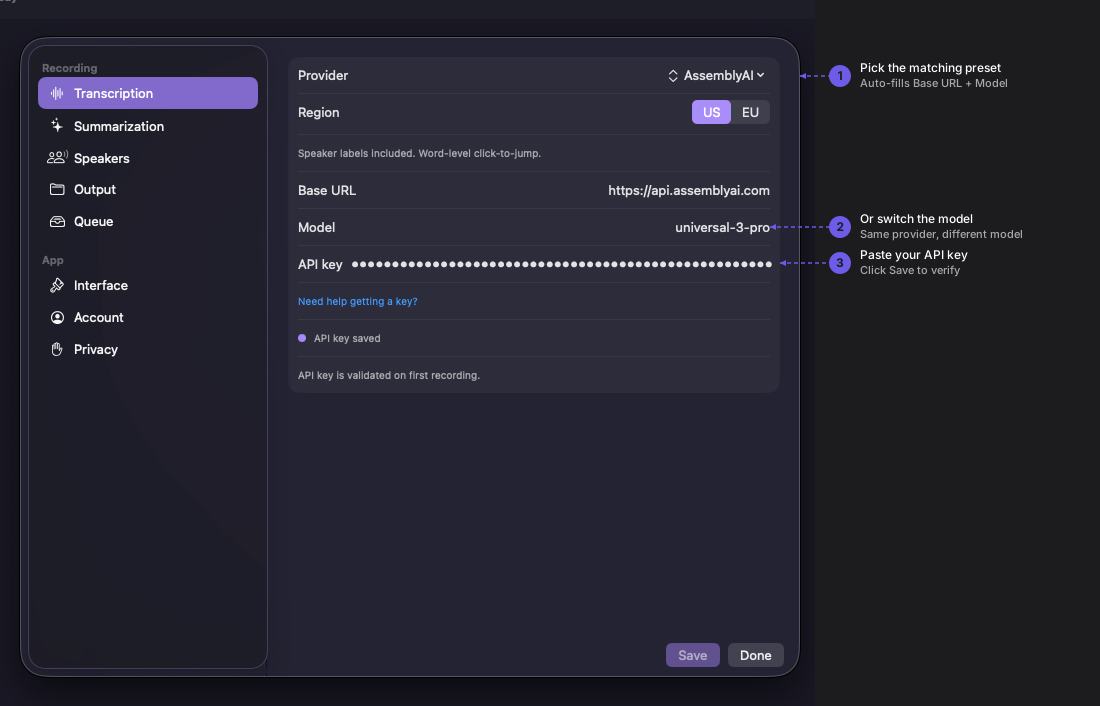
Navigate to Quendian → Preferences → Transcription.
3. Pick the preset, choose a region, paste your key
Section titled “3. Pick the preset, choose a region, paste your key”Select AssemblyAI from the provider dropdown (listed under Transcribe + speakers).
Pick your Region — US (default, api.assemblyai.com) or EU (api.eu.assemblyai.com). Both regions produce equivalent transcription quality. The choice determines where your audio is processed; see AssemblyAI’s data-retention docs for the implications.
Paste your API key and click Save.
What Quendian sends
Section titled “What Quendian sends”Each transcription request sends:
- Your audio in WAV format, 16 kHz mono
- Request flags:
speaker_labels: true,language_code: "en",transcript_ttl_seconds: 3600
The transcript_ttl_seconds: 3600 flag tells AssemblyAI to delete the transcript from their servers 1 hour after it is created. Audio files are subject to AssemblyAI’s standard retention period (approximately 24 hours per their documentation).
What you get back
Section titled “What you get back”- Full transcript text with word-level timestamps (used for click-to-jump in the Quendian transcript view)
- Speaker labels (
Speaker A,Speaker B, …) mapped to Quendian’s global speaker IDs across sessions
Monitor usage and pricing
Section titled “Monitor usage and pricing”For current rates, see AssemblyAI’s pricing page. Track your usage at app.assemblyai.com/billing.