
OpenRouter
OpenRouter is a unified API that routes requests to dozens of AI providers. One key gives you access to models from OpenAI, Anthropic, Mistral, Meta, and more.
Role: Summarization only
| Role | Default model |
|---|---|
| Summarization | openai/gpt-4o-mini |
1. Create an API key
Section titled “1. Create an API key”Go to openrouter.ai/keys and click Create Key.
Key format: sk-or-v1-…
Copy the key immediately.
2. Open Preferences in Quendian
Section titled “2. Open Preferences in Quendian”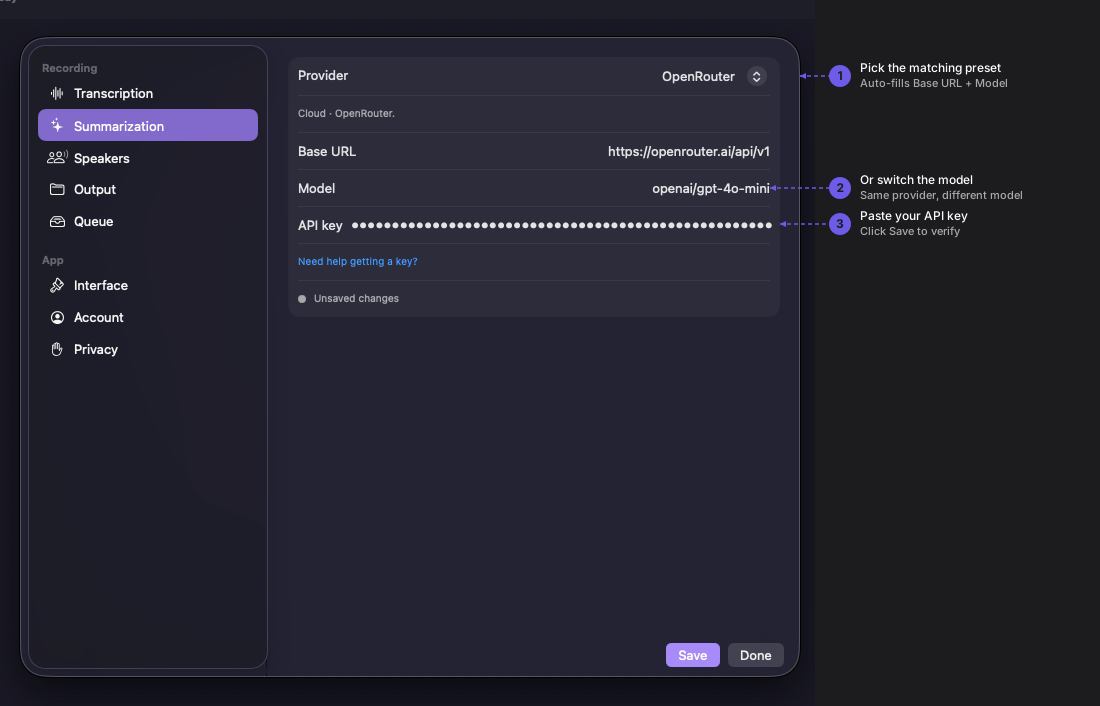
Navigate to Quendian → Preferences → Summarization.
3. Paste your key
Section titled “3. Paste your key”Select the OpenRouter preset under Summarization, paste the key, and click Save.
Switching models
Section titled “Switching models”Quendian defaults to openai/gpt-4o-mini via OpenRouter. If you want to use a different model (e.g., anthropic/claude-3-haiku or meta-llama/llama-3-8b-instruct), use the Custom preset instead and enter the OpenRouter base URL (https://openrouter.ai/api/v1) along with your preferred model identifier.
Monitor usage and pricing
Section titled “Monitor usage and pricing”For per-model rates, see openrouter.ai/models. Track your usage at openrouter.ai/activity.