
LM Studio (local)
LM Studio provides a graphical interface for downloading, managing, and running local AI models. All inference runs on your Mac, so requests don’t go to any external API.
Role: Summarization only (local models do not provide transcription)
Hardware requirements:
| Component | Minimum |
|---|---|
| Chip | Apple M1 or later |
| RAM | 16 GB unified memory |
1. Install LM Studio
Section titled “1. Install LM Studio”Download and install from lmstudio.ai.
2. Download a model
Section titled “2. Download a model”In LM Studio, search for a model and click Download. Recommended models:
- Llama 3.x (Meta) — strong general summarization
- Qwen 7B–13B (Alibaba) — efficient on 16 GB RAM
3. Start the local server
Section titled “3. Start the local server”- Open the Local Server tab in LM Studio (the
<->icon in the sidebar). - Select your downloaded model from the Loaded Model dropdown.
- Click Start Server.
The server listens on http://localhost:1234/v1 by default.
4. Open Preferences in Quendian
Section titled “4. Open Preferences in Quendian”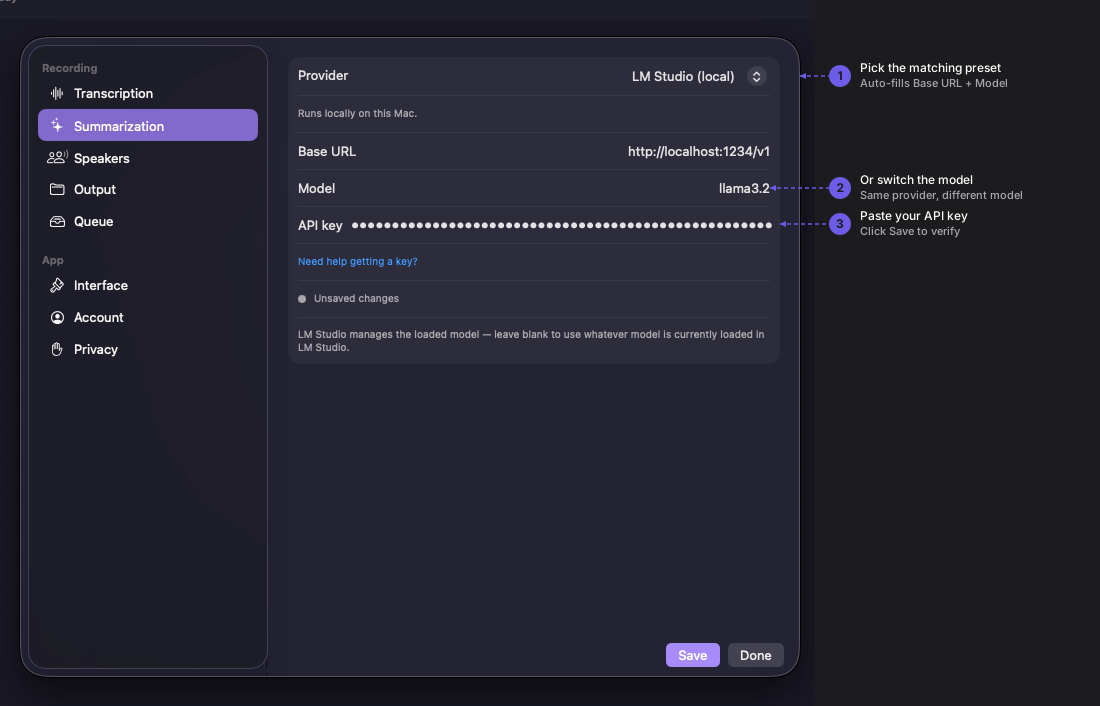
Navigate to Quendian → Preferences → Summarization.
5. Configure the LM Studio preset
Section titled “5. Configure the LM Studio preset”Select the LM Studio preset under Summarization. Quendian pre-fills the endpoint (http://localhost:1234/v1) — no API key is required.
The Model field must match exactly the model name shown in LM Studio’s Loaded Model dropdown.
Click Save.
Runs on your Mac
Section titled “Runs on your Mac”All inference happens locally — no data leaves your machine and no requests go to any external API. Running on your Mac means performance scales with your hardware; an M2 Pro or M3 will summarize faster than an M1.