
Together AI
Together AI hosts a wide range of open-source models on shared inference infrastructure.
Role: Summarization only
| Role | Model |
|---|---|
| Summarization | meta-llama/Meta-Llama-3.1-70B-Instruct-Turbo |
1. Create an API key
Section titled “1. Create an API key”Go to api.together.ai/settings/api-keys and click Create API Key.
Key format: long alphanumeric string (no fixed prefix)
Keys are account-wide.
Copy the key immediately.
2. Open Preferences in Quendian
Section titled “2. Open Preferences in Quendian”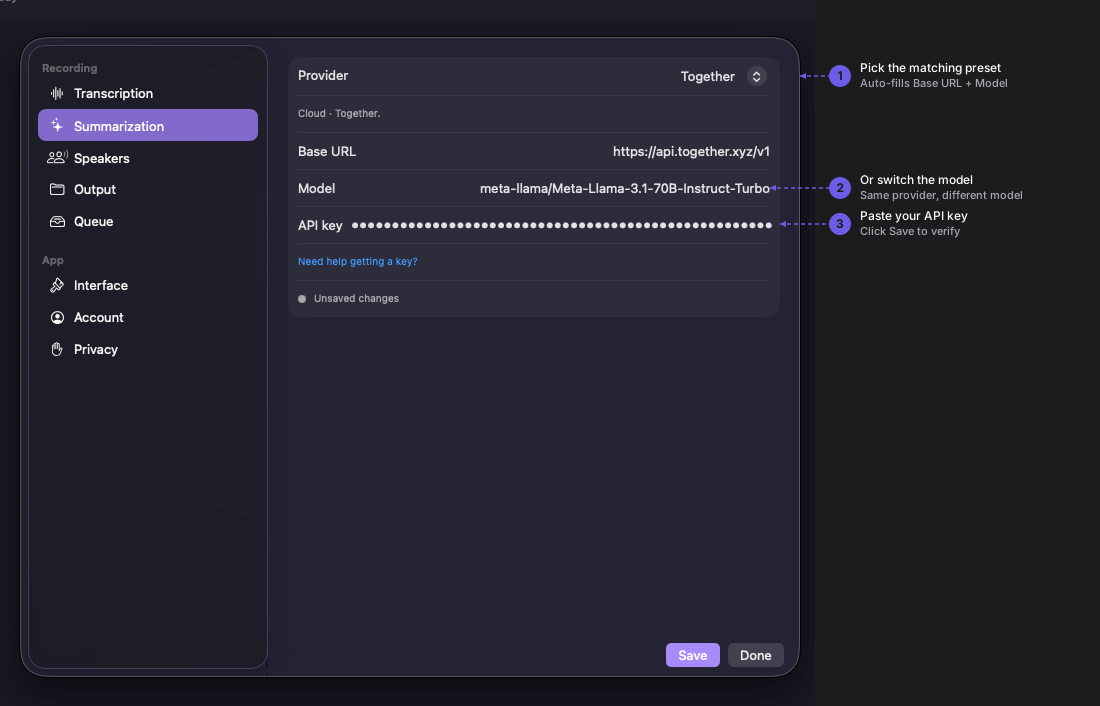
Navigate to Quendian → Preferences → Summarization.
3. Paste your key
Section titled “3. Paste your key”Select the Together AI preset under Summarization, paste the key, and click Save.
Monitor usage and pricing
Section titled “Monitor usage and pricing”For current rates, see Together AI’s pricing page. Track your usage at api.together.ai/settings/billing.