
Deepgram
Nova-3 is Deepgram’s current flagship transcription model. It processes audio synchronously — the response arrives in a single request with no polling required.
Role: Transcription only
| Role | Model |
|---|---|
| Transcription | nova-3 |
1. Create an API key
Section titled “1. Create an API key”Go to deepgram.com and sign up or sign in.
Navigate to Console → API Keys and click Create a Key.
Key format: 40-character hex string
Keys are project-scoped in Deepgram’s console.
Copy the key immediately — Deepgram shows it only once.
2. Open Preferences in Quendian
Section titled “2. Open Preferences in Quendian”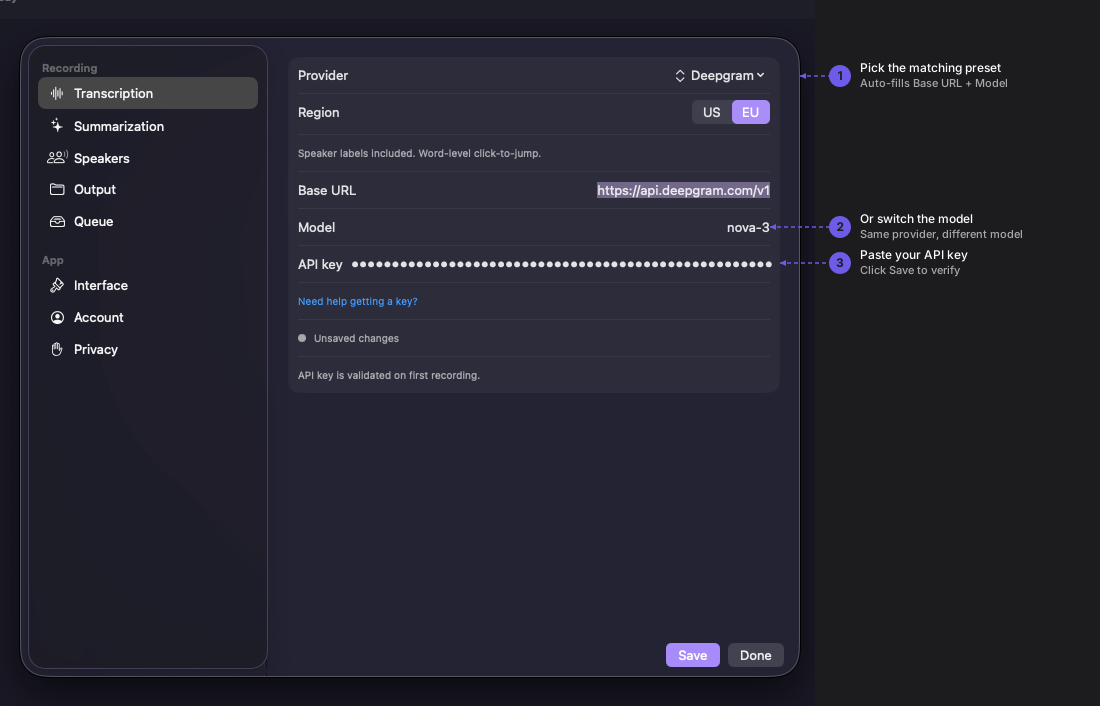
Navigate to Quendian → Preferences → Transcription.
3. Pick the preset, choose a region, paste your key
Section titled “3. Pick the preset, choose a region, paste your key”Select Deepgram from the provider dropdown (listed under Transcribe + speakers).
Pick your Region — US (default, api.deepgram.com) or EU (api.deepgram.eu.com). Both regions use the same Nova-3 model. The choice determines where your audio is processed; see Deepgram’s data policy for the implications.
Paste your API key and click Save.
What Quendian sends
Section titled “What Quendian sends”Each transcription request sends:
- Your audio in WAV format, 16 kHz mono
- Query parameters:
model=nova-3,diarize=true,punctuate=true,language=en
Deepgram processes the audio synchronously and does not retain audio beyond the lifetime of the request, per their data policy.
What you get back
Section titled “What you get back”- Full transcript text with word-level timestamps (used for click-to-jump in the Quendian transcript view)
- Speaker labels (
Speaker A,Speaker B, …) mapped to Quendian’s global speaker IDs across sessions
Monitor usage and pricing
Section titled “Monitor usage and pricing”For current rates, see Deepgram’s pricing page. Track your usage at console.deepgram.com/usage.