
Custom (OpenAI-compatible endpoint)
The Custom preset lets you connect any OpenAI-compatible API endpoint to Quendian — for either transcription or summarization. This covers self-hosted inference servers, private cloud deployments, and aggregator services not listed as named presets.
Roles: Transcription and/or Summarization (any endpoint that implements the relevant OpenAI API contract)
API contracts
Section titled “API contracts”Summarization
Section titled “Summarization”Quendian sends summarization requests using the standard OpenAI Chat Completions format:
POST /chat/completionsAuthorization: Bearer <your-key>Content-Type: application/json
{  "model": "<your-model>",  "messages": [...]}
Any server that implements the OpenAI-compatible POST /chat/completions endpoint and accepts Bearer token authentication will work.
Compatible summarization servers:
- vLLM — high-throughput inference server
- TGI (Text Generation Inference) — Hugging Face’s server
- LiteLLM — proxy that translates to 100+ provider APIs
- Any other OpenAI-compatible aggregator or self-hosted deployment
Transcription
Section titled “Transcription”Quendian sends transcription requests using the standard OpenAI Whisper API format:
POST /audio/transcriptionsAuthorization: Bearer <your-key>Content-Type: multipart/form-data
file: <audio bytes>model: <your-model>response_format: verbose_json
Any server that implements the OpenAI-compatible POST /audio/transcriptions endpoint and returns Whisper-shape JSON (segments and word-level timestamps in verbose_json mode) will work.
Compatible transcription servers:
- faster-whisper-server — high-performance self-hosted Whisper
- whisper.cpp — local C++ implementation with an OpenAI-compatible server mode
- LiteLLM — proxy that routes to upstream Whisper providers
- Any other server that implements the OpenAI
/audio/transcriptionscontract
1. Note your endpoint and credentials
Section titled “1. Note your endpoint and credentials”You need:
- Base URL — e.g.
https://your-server.example.com/v1orhttp://localhost:8000/v1 - API key — or any Bearer token your server accepts (leave blank if your server has no auth)
- Model name — the identifier your server expects (e.g.
whisper-large-v3for transcription,llama3ormistral-7bfor summarization)
2. Open Preferences in Quendian
Section titled “2. Open Preferences in Quendian”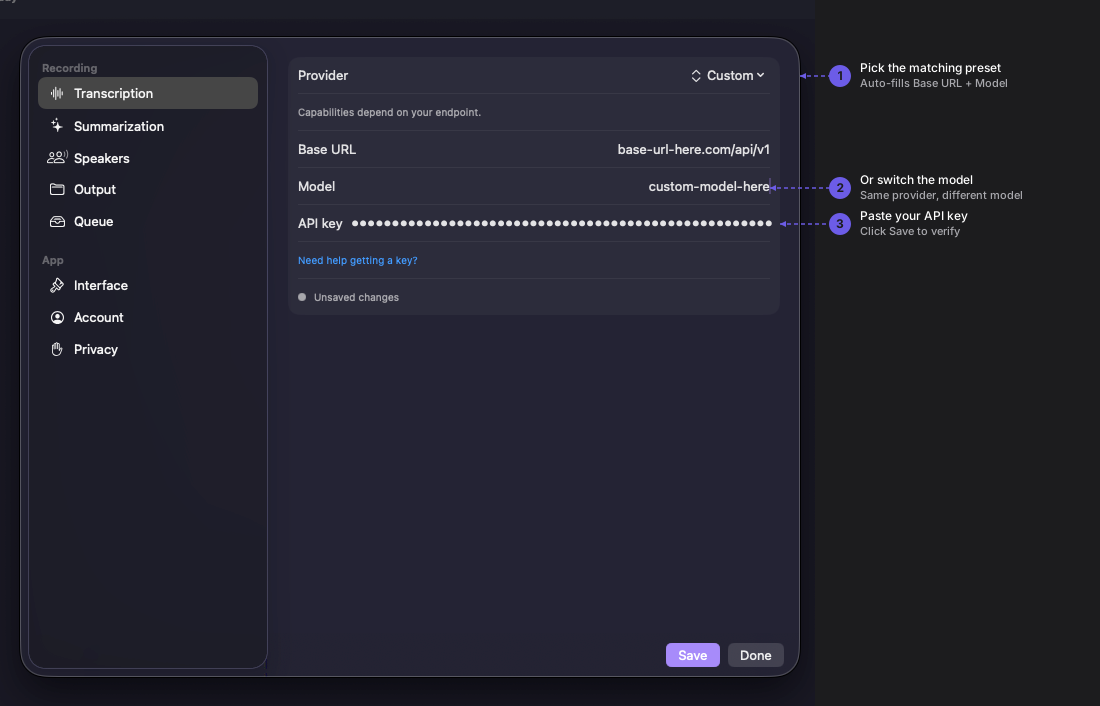
Navigate to Quendian → Preferences → Summarization.
3. Select Custom preset
Section titled “3. Select Custom preset”Choose the Custom preset under the role you want to configure (Transcription or Summarization) and fill in:
| Field | Value |
|---|---|
| Base URL | Your OpenAI-compatible endpoint (include /v1) |
| API key | Your Bearer token (or leave blank) |
| Model | Model identifier your server expects |
Click Save.
You can use Custom for both roles independently — for example, a self-hosted Whisper server for transcription and a hosted OpenAI-compatible LLM for summarization.